## Why PenguinHarness
> With LangChain, you build agents by hand — at 1× speed. With PenguinHarness, agents build agents — at 100×.
Three reasons, in deliberate order — from task quality, to how agents get built, to how they keep improving.
### 1. 🏆 Outstanding results at tens of times less cost
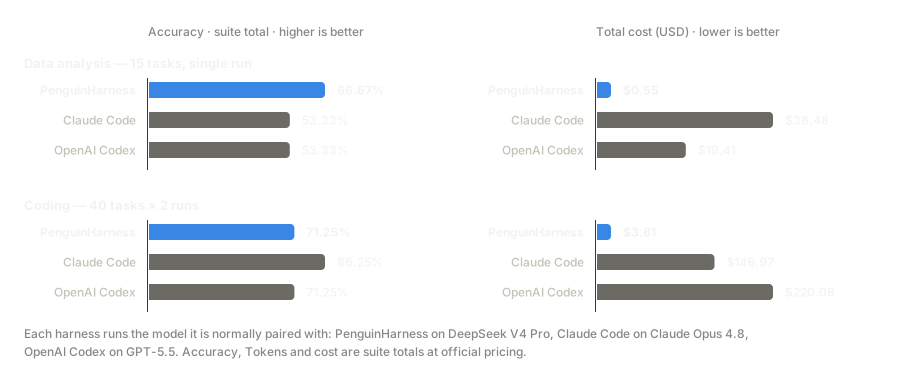
A deliberately minimal toolset over clean low-level interfaces: fewer tool calls, fewer tokens — deeply tuned for open models like DeepSeek. Each harness on the model it is normally paired with, same tasks, head-to-head:
**Best accuracy on data analysis — at 1/70 of Claude Code's cost.**
### 2. ⚡ One sentence, and an agent builds your agent app
Type one sentence, and an agent builds the complete agent application for you — scaffold, code, and run instructions, end to end:
```text
Collect the docs from https://github.com/ericbuess/claude-code-docs and build a RAG app that answers Claude Code questions as a configuration expert, citing its sources.
```
And this is the finished product — a docs expert with retrieval, cited sources that link to the original files, and example questions built in:
https://github.com/user-attachments/assets/9b7033e8-f08a-4c3f-bd33-547896664e6e
**And generating this entire RAG app burned just $0.02 (¥0.2) of tokens — on DeepSeek V4 Pro.**
### 3. 🧬 Self-evolution: it gets stronger with use
With PenguinHarness Skills, an agent evaluates and optimizes itself: run the benchmark, find the lost points, ship version N+1 — with a snapshot before every round, and every request observable in the Trace view.
https://github.com/user-attachments/assets/922d13a6-5ffc-4685-9a39-352f02f9afc0
## Built-in Skills
Four Skill groups ship in the box ([docs](https://penguin.ooo/docs/skills)); agents can also write and optimize their own:
| Group | Skills |
| -------------------- | --------------------------------------------------------------------------------- |
| Office Productivity | `data-analysis`, `firecrawl` |
| Software Development | `web-design`, `software-engineering` |
| AI App Development | `penguin-sdk`, `penguin-cli`, `agenthub-models`, `vllm`, `ollama`, `llamafactory` |
| Agent Tuning | `agent-creation`, `benchmark-design`, `agent-evaluation`, `agent-optimization` |
## Supported Models
| Model | Providers |
| ---------------- | -------------------------------------------------------------------------------- |
| DeepSeek V4 | DeepSeek, OpenRouter, Fireworks AI, SiliconFlow, Qwen Token Plan |
| Kimi K3 | Moonshot AI, OpenRouter, Qwen Pay-As-You-Go |
| GLM 5.2 | Z.AI, OpenRouter, Fireworks AI, SiliconFlow, Qwen Token Plan, Qwen Pay-As-You-Go |
| Hunyuan 3 | OpenRouter |
| Qwen 3.8 Max | Qwen Token Plan (preview) |
| GPT 5.6 | OpenRouter |
| Gemini 3.6 Flash | Google Gemini, OpenRouter |
| Claude 5 | Anthropic, OpenRouter |
Each family's latest generation only — the app's **Models** page lists every built-in preset, and any OpenAI-protocol endpoint works too: pick a preset, or point a custom endpoint at any of the 1000+ online and local models.
## Requirements
| Requirement | Supported |
| ------------ | -------------------------------------------------------------------------- |
| OS | Linux, macOS, Windows 10+ |
| Architecture | x64, arm64 |
| Runtime | bundled by the one-line installer (npm installs need Node >= 24) |
| Model | an API key for at least one model |
## Installation
Every route installs the same `penguin` command: `penguin web` launches the full Web experience (multi-session chat, agent/skill/model management, usage stats, Trace observability, evaluation center; first login admin / penguin-2026 — change the password right after), and models are configured on the in-app Models page. The online installers bundle their own Node runtime — unpack and run; upgrades and reinstalls never touch your data.
### 🐧 Linux (online install)
```bash
curl -fsSL https://penguin.ooo/install.sh | sh
penguin web # start the service and open http://127.0.0.1:7364
```
### 🍎 macOS (online install)
```bash
curl -fsSL https://penguin.ooo/install.sh | sh
penguin web # start the service and open http://127.0.0.1:7364
```
### 🪟 Windows (online install, PowerShell)
```powershell
irm https://penguin.ooo/install.ps1 | iex
penguin web # start the service and open http://127.0.0.1:7364
```
### 📦 npm (any platform, Node >= 24)
```bash
npm install -g @prismshadow/penguin-cli
penguin web # start the service and open http://127.0.0.1:7364
```
📴 Offline install (air-gapped machines)
Every GitHub Release attaches exactly one package per target — Linux and macOS in x64 / arm64, Windows in x64, plus a runtime-less universal package — and the same file serves online and offline installation. Each package seals the program payload, its SHA256 checksum and the platform's installer: download the one file on a networked machine, copy it to the target, extract once and run the bundled installer — no network, no separate checksum file to carry (the sealed SHA256 is always verified).
**Linux (on arm64, use `penguin-linux-arm64.tar.gz`):**
```bash
mkdir penguin-install
tar -xzf penguin-linux-x64.tar.gz -C penguin-install
./penguin-install/install.sh
```
**macOS (Apple silicon shown; on Intel, use `penguin-darwin-x64.tar.gz`):**
```bash
mkdir penguin-install
tar -xzf penguin-darwin-arm64.tar.gz -C penguin-install
./penguin-install/install.sh
```
**Windows (unzip, then double-click `install.cmd` — or run it in PowerShell):**
```powershell
Expand-Archive penguin-win32-x64.zip -DestinationPath penguin-install
cd penguin-install
.\install.cmd
```
### 🤖 CLI & SDK — for agents
The same engine, scriptable — made to be driven by agents (and agents building agents):
```bash
penguin config model add --provider deepseek --model-id deepseek-v4-pro --api-key sk-... --set-default
penguin run -m "Create hello.txt containing Hello, Penguin" # one-shot task
penguin chat # interactive REPL (/compact, /exit, Ctrl-C to interrupt)
penguin server # headless service (same API the Web App uses)
```
```ts
import { createAgent, isCompleteModelMessage, userText } from "@prismshadow/penguin-core";
const agent = await createAgent({ agentId: "default_agent" });
const session = await agent.createSession({ workspaceDir: process.cwd() });
for await (const output of session.run([userText("Create hello.txt containing hi")], {
approve: async () => "allow", // per-tool-call approval
})) {
if (isCompleteModelMessage(output) && output.payload.type === "text") {
console.log(output.payload.text);
}
}
```
## Roadmap
- [ ] Public release of the benchmark suite
- [ ] Desktop app
- [x] Windows support
- [ ] Agent company and templates
- [ ] Company-level self evolving
- [ ] OpenShell integration (permission-governed shell)
- More to come…
## Development
```bash
pnpm install && pnpm build # build first: core's exports point at dist/
pnpm dev # backend + web app together (prefixed logs, deps built once)
```
See [CONTRIBUTING.md](CONTRIBUTING.md) for the full workspace guide: dev commands, quality gates, repo layout, and the changelog rule.
## Contributors
Thanks to everyone who has contributed to PenguinHarness!